Neglect the cleaning, and the consequences stack up fast: reduced particle capture, higher energy bills, potential arcing inside the cell, and air quality that gradually degrades without any obvious warning sign until something fails.
This guide covers how to clean traditional collector-cell electronic air cleaners correctly, when to do it, and how polarized pad-based systems like ECOairflow's product line simplify that maintenance picture considerably.
Key Takeaways
- Collector cells and pre-filters must be cleaned regularly to maintain filtration performance and protect your HVAC system
- Cleaning frequency varies widely — from twice weekly in commercial kitchens to every 2–3 months in light residential use
- Always shut off power and wait at least 15–30 seconds before handling any components
- Use only aluminum-safe alkaline detergents — never coil cleaners or laundry detergent
- Inspect components for damage every cleaning cycle — arcing sounds require immediate shutdown and investigation
- ECOairflow's Electronic Polarization Technology uses replaceable pads — no washing required, just swap and reinstall
Why Cleaning Your Electronic Air Cleaner Matters
Dirty Cells Stop Trapping Particles
As collector plates accumulate dust, smoke residue, and oily film, that buildup insulates the plates from the airstream. The electrostatic charge can no longer bridge the gap to incoming particles effectively, so particles that should be captured pass straight through.
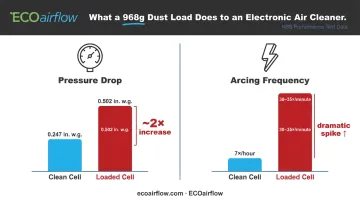
A National Bureau of Standards test of an Electro-Air EAC found that after a 968-gram dust load, pressure drop nearly doubled — from 0.247 to 0.502 in. w.g. — and arcing frequency jumped from 7 times per hour to 30–35 times per minute. That's not a gradual decline; it's a cliff.
Energy and HVAC System Impact
A clogged cell forces your HVAC fan to work harder against increased resistance. Research on HVAC filter loading shows dust-loaded filters account for more than 20% of total energy consumption in commercial buildings. The same pressure-drop relationship applies to EAC cells — more resistance means more fan power and higher operating costs.
The Cost of Skipping Maintenance
Routine cleaning costs almost nothing. What it prevents is far more expensive:
- Arcing damage — persistent electrical arcing from contaminated cells burns insulator surfaces and can destroy ionizer wires
- Component failure — bent collector plates and dislodged ionizer wires require corrective service or replacement
- Full unit replacement — a cell damaged by sustained arcing may not be repairable
Most manufacturers recommend cleaning every 1–3 months depending on air quality and usage. The sections below walk through exactly how to do it.
Types of Maintenance for Electronic Air Cleaners
Not all maintenance is the same. Some tasks belong in your regular schedule; others are triggered by visible damage or a performance failure.
Routine Cleaning (Cells, Pre-Filters, and Pads)
Routine cleaning is the most frequent and most impactful task. For traditional washable-cell systems, this means removing the collector cells and pre-filters, washing them with an appropriate solution, and reinstalling them fully dry.
Carrier's AIRA documentation specifies the following schedule:
- Standard homes: Clean cells and pre-filters 4–6 times per year; thorough wash every 2–3 months
- High-dust or high-smoke environments: Monthly cleaning recommended (new construction, heavy cigarette smoke)
For polarized pad-based systems, the routine is different — and simpler. ECOairflow's pad-based models use disposable glass-fiber mesh pads — no soaking, no drying, no reassembly. Open the housing, pull the old pad, drop in a new one.
| Model | Application | Replacement Cycle |
|---|---|---|
| Dynamo 1", Model 1000, Model 1500 | Residential | Every 3 months |
| Model 2300, M-Series Hybrid | Commercial / Hospital | Every 3–6 months |
Corrective and Professional Servicing
Corrective maintenance is triggered by damage found during a routine inspection:
- Bent collector plates — can sometimes be carefully straightened with flat-nose pliers
- Broken or dislodged ionizer wires — require replacement; count the wires per cell every time you inspect
- Arcing from contaminated insulators — clean the insulator surfaces thoroughly and re-inspect before restoring power
- Burn marks on the cell frame — a sign of sustained arcing; evaluate whether the cell needs replacement
For commercial installations — hospitals, airports, and schools in particular — schedule an annual professional inspection. Verifying electrical contact integrity and confirming rated filtration performance is a compliance requirement, not just best practice.
How to Tell When Your Electronic Air Cleaner Needs Cleaning
Performance and Output Changes
The first signs are often invisible: more dust settling on surfaces than usual, slightly reduced airflow from registers, or an uptick in energy bills. These signal that the cells or pre-filters are loaded and no longer capturing particles efficiently. If you have a pressure gauge or manometer on the system, Honeywell's F300 documentation flags cleaning as required when pressure drop reaches 0.5 in. w.c.
Visible Buildup and Physical Indicators
When instrument readings aren't available, a direct inspection tells you just as much. Pull the cell out and examine it under bright light — dark, coated, or oily plates are a clear sign cleaning is overdue. Arcing sounds (snapping or clicking during operation) indicate contamination has reached a level that's actively stressing electrical components. Shut it down and clean immediately; continued operation risks permanent damage.
Operational Irregularities
Watch for:
- Indicator light or wash alert — some models (Honeywell F58G/H, Carrier AIRA via smart thermostat) display a cleaning reminder after a set runtime
- Unusual odors — burning or ozone-like smells from the unit
- Unexpected shutoff — the unit cycling off without a programmed reason
Any of these signals a cell that needs immediate attention.
How to Clean Your Electronic Air Cleaner the Right Way
Step 1 — Safety First
Shut off power to the HVAC system and the electronic air cleaner at both the unit switch and the breaker box. Then wait. Carrier's AIRA and Trane's CleanEffects documentation both specify waiting at least 15 seconds after switching off before opening or removing any components, allowing residual charge to dissipate. OSHA's 1910.333 standard treats capacitors as a stored-energy hazard requiring discharge before contact. Follow that standard.
Wear chemical-resistant gloves and safety goggles throughout the process.
Step 2 — Remove Components Carefully
Slide out the collector cells and pre-filters. Handle cells by the frame or handle only — not by the ionizer wires or collector plates directly. Distorting a plate or dislodging a wire during removal compromises electrical performance. Replace the access door while you're working to keep debris from re-entering the duct.
Step 3 — Inspect Before Cleaning
Under bright light, check every cell for:
- Bent or kinked collector plates (straighten with flat-nose pliers)
- Missing or dislodged ionizer wires (count them — each cell has a specific number)
- Burn marks indicating arcing damage
- Cracked or damaged frame components that indicate replacement rather than cleaning
Catching damage now prevents reinstalling a cell that will arc or underperform.
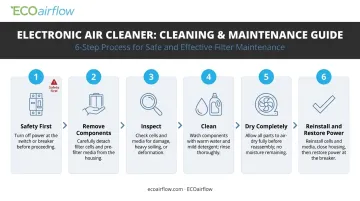
Step 4 — Clean Using the Right Method and Solutions
Two approved approaches:
Soaking method (recommended for heavy buildup):
- Dissolve an aluminum-safe alkaline detergent in hot water — automatic dishwasher detergent works; Honeywell specifies ¾ cup per cell, Carrier recommends 2–4 oz
- Submerge the cell for 1–2 minutes (Carrier specifies 30 minutes for heavy cleaning)
- Rinse thoroughly with clean hot water
- Never use coil cleaners, contact cleaners, or laundry detergent — Honeywell's documentation explicitly warns these degrade cell metal
Garden hose or tub method (for lighter cleaning):
- Rinse with a garden hose using a spray nozzle at moderate pressure
- Hold the nozzle at least 2 feet away — Honeywell's F300 manual warns that high pressure bends plates and breaks ionizer wires
- Clean pre-filters after cells, not before, to prevent lint from contaminating the wash solution
On dishwashers — manufacturer rules vary significantly:
- Honeywell F300: Permits dishwasher cleaning, but forbids the drying cycle (heat bakes contaminants onto plates)
- Carrier AIRA: Discourages dishwasher use due to wire damage risk
- Trane CleanEffects: Prohibits dishwasher cleaning entirely
Check your unit's manual before loading cells into a dishwasher.
Step 5 — Dry Completely Before Reinstalling
Air dry only — no heat drying. Heat bakes residual contaminants onto the plates, making future cleaning harder. Honeywell's F300 documentation recommends waiting 2–3 hours before reinstalling. Wet cells cause arcing and may prevent indicator lights from operating normally. A few snapping sounds immediately after reinstallation are normal — that's residual moisture evaporating during the first minutes of operation.
Step 6 — Reinstall Correctly and Restore Power
Before you close anything up:
- Confirm the directional arrow on the cell aligns with airflow — ionizer wires face upstream
- Check that all electrical contacts are clean and making solid contact
- Secure the access door
- Restore power and run the system briefly to confirm normal operation (no sustained arcing sounds)
Electronic Air Cleaner Cleaning Schedule
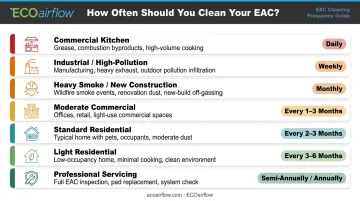
Cleaning frequency is not one-size-fits-all. The right interval depends on the environment, the pollutant load, and whether the system runs continuously or intermittently.
| Environment | Recommended Cleaning Interval |
|---|---|
| Commercial kitchen exhaust | Daily washing |
| Industrial / high-pollution | Per-use or weekly |
| Heavy smoke / new construction dust | Monthly |
| Moderate commercial use | Every 1–3 months |
| Standard residential use | Every 2–3 months |
| Light residential use | Every 3–6 months |
| Professional servicing | Semi-annually or annually |
Environment-Specific Factors
High-contaminant settings shorten cleaning cycles significantly:
- Commercial kitchens — Trion's Air Boss ATS documentation specifies daily washing for kitchen exhaust ESP applications
- Machining shops and casinos — heavy smoke and airborne particulate typically require cleaning twice per week
- New construction — plaster dust loads cells rapidly; monthly cleaning is standard during and immediately after construction
- Light residential with low allergen loads — the Honeywell F300 documents a 6–12 month cell cleaning interval at the longer end of the residential range
Polarized Pad Systems: A Different Maintenance Model
Polarized pad systems skip the wash-and-dry cycle entirely. ECOairflow's residential models (Dynamo 1", Model 1000, Model 1500) swap pads every 3 months. No soaking, no drying time, no checking for bent plates.
Commercial models (Model 2300, M-Series Hybrid) follow a 3–6 month cycle based on facility conditions. The permanent aluminum or metal housing stays in place indefinitely — only the glass-fiber mesh pad is replaced.
The performance difference is measurable. ECOairflow's depth-capture design keeps pressure drop nearly constant throughout the pad's service life. Traditional pleated and washable-cell filters, by contrast, show a 60%+ increase in fan power demand as they load.
ECOairflow also offers a free email pad-reminder service to keep homeowners and facility managers on schedule without manual tracking.
Frequently Asked Questions
How long do electronic air cleaners last?
Electronic air cleaners can last a decade or more with routine upkeep. Carrier notes a typical service life of 10–20 years when maintained per manufacturer specifications. Neglected cells, damaged ionizer wires, or unchecked arcing shorten that lifespan significantly.
How often should you clean an electronic air cleaner?
Most manufacturers recommend cleaning every 1–3 months for residential use. Heavily polluted or high-traffic commercial environments — commercial kitchens, machining shops, casinos — may require cleaning as frequently as twice per week.
Can I put electronic air cleaner cells in the dishwasher?
Some manufacturers permit it with restrictions — no drying cycle, and cells must be elevated above dishwasher spikes to protect ionizer wires and plates. Carrier and Trane prohibit dishwasher cleaning entirely. Always check your specific model's manual before attempting this.
What cleaning solution is safe for electronic air cleaner cells?
Use only aluminum-safe alkaline detergents — specifically automatic dishwasher detergent. Coil cleaners, contact cleaners, and harsh chemical cleaners damage aluminum cell components. Never substitute laundry detergent.
What happens if you don't clean your electronic air cleaner?
Uncleaned cells become insulated by contaminant buildup, stopping particle capture entirely. The results include degraded indoor air quality, potential arcing that damages electrical components, higher energy bills, and eventual system failure.
Can I use water alone to clean my electronic air cleaner?
Water works for rinsing, but not for cleaning. Oily, sticky, or smoke-residue contamination on collector plates requires an aluminum-safe detergent to dissolve and release from the plate surface. Water alone leaves that residue behind, and the cell will underperform after reinstallation.